We are looking at a significant shift in how we interact with large language models today. Antropy has released Cloudopus 4.6, and it is not just a standard version bump. While everyone is busy comparing benchmark scores, the real game-changer here is the introduction of Agent Teams. This feature allows you to spawn multiple AI agents that work in parallel, coordinate with each other, and function like a real software development squad inside your terminal.
If you have been struggling with context limits or complex reasoning tasks where the model forgets instructions halfway through, you are in the right place. We are going to explore how Cloudopus 4.6 handles massive projects with its improved context window and test its coding capabilities by building a full-stack analytics dashboard from scratch.
Cloudopus 4.6: Key Features at a Glance
Before we open our code editor, we need to understand what powers this new model. The updates focus on utility and workflow integration rather than just raw speed.
Agent Teams: Your Digital Workforce
This is the highlight of the release. In previous versions, we used sub-agents that worked sequentially and reported back to a main agent. It was effective but slow. Now, Cloudopus 4.6 introduces Agent Teams.
Think of this as running a small tech startup. You have a Team Lead, a Frontend Developer, a Backend Developer, and a QA Engineer.
- Parallel Execution: The database agent does not wait for the UI agent to finish. They work simultaneously.
- Direct Communication: Teammates message each other directly. The backend agent can tell the frontend agent, Here is the API endpoint structure, and the frontend agent adapts its code immediately without routing everything through you.
- Shared Context: While they have independent context windows to save on token usage, they share a master task list and project state.
1 Million Token Context & Needle in a Haystack
Memory has always been a bottleneck. Cloudopus 4.6 pushes the context window to 1 million tokens. To put this into perspective, you can load entire libraries of documentation or massive codebases into the prompt.
In the Needle in a Haystack benchmark (a test where a specific piece of information is hidden in a massive block of text), Cloudopus 4.6 achieves a 76% retrieval accuracy at full 1M context. This is a massive leap compared to previous iterations like Sonnet 4.5, which struggled significantly at these depths. This means you can have long, complex coding sessions without the model forgetting the first file you created.
Adaptive Thinking
Not every prompt requires deep philosophical contemplation. Sometimes you just want a quick answer. Cloudopus 4.6 utilizes Adaptive Thinking, where the model automatically determines the effort level required for a task. It saves you time on simple queries and allocates more processing power to complex logical problems without you needing to toggle settings manually.
Performance Benchmarks: Cloudopus 4.6 vs. GPT 5.2
Numbers tell a specific story, and in the world of AI development, we look at ELO ratings and specific capability scores. Here is how the new model stacks up against its main competitor, GPT 5.2.
| Benchmark Category | Cloudopus 4.6 Score | GPT 5.2 Score | Note |
|---|---|---|---|
| Knowledge Work | 1606 ELO | \~1462 ELO | Measures performance in finance, law, and complex data processing. |
| Agentic Search | 4.68 | 4.62 | Evaluates how well the model acts as an autonomous research agent. |
| Coding Capabilities | 65.4% | 63% | Direct code generation and problem-solving accuracy. |
| Reasoning (Humanity Last) | 53.1% | 50% | Tests ability to solve professional-level math and philosophy problems using tools. |
The gap in Coding Capabilities is particularly interesting for us. A 2% difference might seem small, but in complex refactoring tasks, it often determines whether the code runs on the first try or requires hours of debugging.
Hands-on Tutorial: Building an Analytics Dashboard
Theory is fine, but we are here to code. We are going to use the Cloudopus 4.6 Agent Teams feature to build an E-commerce Analytics Dashboard using Next.js, Prisma, and Postgres. We will not write a single line of code manually; the AI team will handle it.
Setting Up the Environment
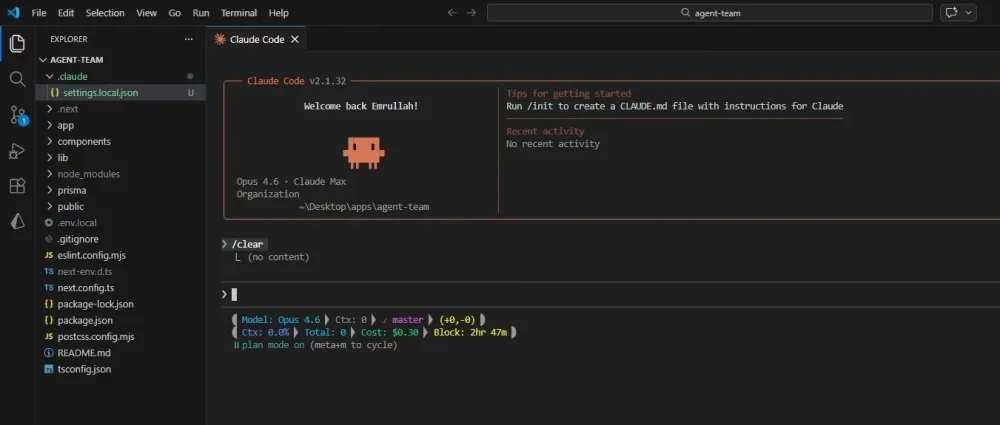
You need the latest version of the generic cloud CLI and the VS Code extension. Since this is an experimental feature, we have to enable it manually.
- Open your global
settings.jsonfile in VS Code. - Add the experimental flag:
"experimental_agent_teams": 1. - Ensure your extension version is updated to support the new API.
Phase 1: Planning with the PRD Agent
We start by defining our intent. We want a robust dashboard. instead of diving into code, we ask the model to plan.
Our Prompt:
Create a PRD agent to analyze my requirements for an e-commerce analytics dashboard. Phase 1 is planning. Identify missing info and create a detailed Plan.md.The model analyzes the request and enters Plan Mode. It asks us critical questions:
- What specific KPIs do you want to track? (Orders, Customers, Revenue)
- Do you need authentication?
- Which UI library should we prefer?
After we confirm these details, it generates a comprehensive PLAN.md file. It breaks down the architecture into specific domains: Database, Authentication, UI Components, and Pages.
Phase 2: Spawning the Team
This is where the magic happens. We instruct the model to move to Implementation Mode.
Our Prompt:
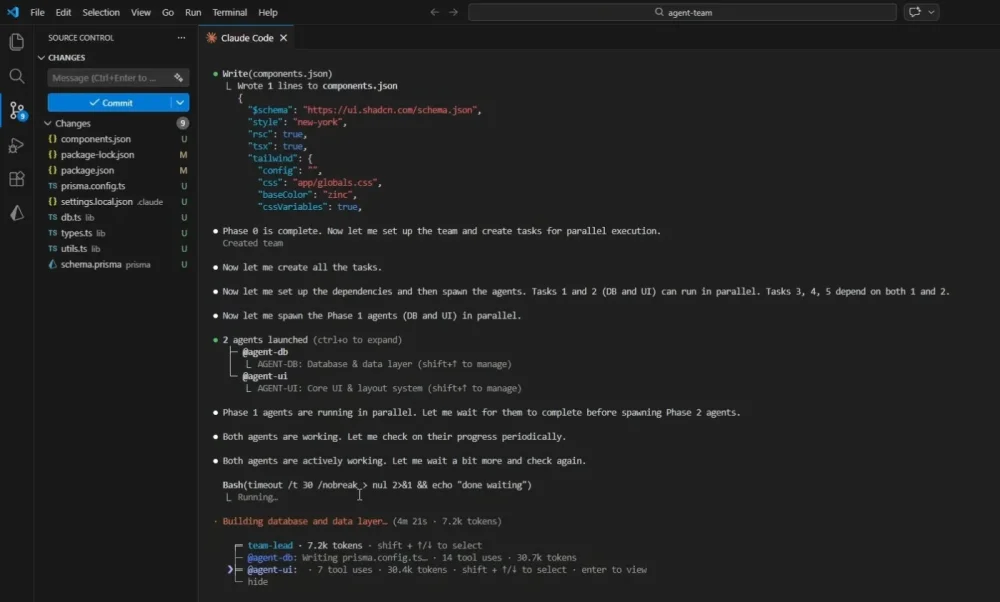
Read Plan.md, parse the tasks, and spawn a Dev Agent for each section. They must work in parallel using a shared task list.The terminal comes alive. You see the main process splitting into specialized roles:
- Agent DB: Starts setting up the Prisma schema and Docker configuration for Postgres.
- Agent UI: Begins scaffolding the Next.js project and installing chart libraries.
- Agent Auth: Configures the authentication logic.
The Observation: You can actually verify the "Parallel Work" claim here. While Agent DB is waiting for package installations, Agent UI is already creating component files. They are not blocking each other. In the terminal, you can switch between agents using Shift + Arrow Keys to see exactly what the Database Agent is typing versus what the Team Lead is coordinating.
Phase 3: Execution and Review
Once the files are created, the Team Lead takes over to coordinate the build.
- Database Push: The agents run
npx prisma db pushto sync the schema. - Seeding: It automatically generates a seed script to populate our dashboard with dummy data (fake orders, customers, and revenue stats) so we are not looking at an empty screen.
- Error Handling: We encountered a small issue during the build process where a type mismatch occurred in the chart component. The Team Lead agent noticed the build failure, summoned a debugger instance, fixed the file, and re-ran the build without our intervention.
The Result
We run npm run dev and open the local host. We are greeted by a fully functional dashboard. It supports Light and Dark modes out of the box. The charts are interactive, showing revenue spikes over the last 30 days. The "Orders" page creates a data table with pagination, and clicking on an order takes you to a dynamic details page.
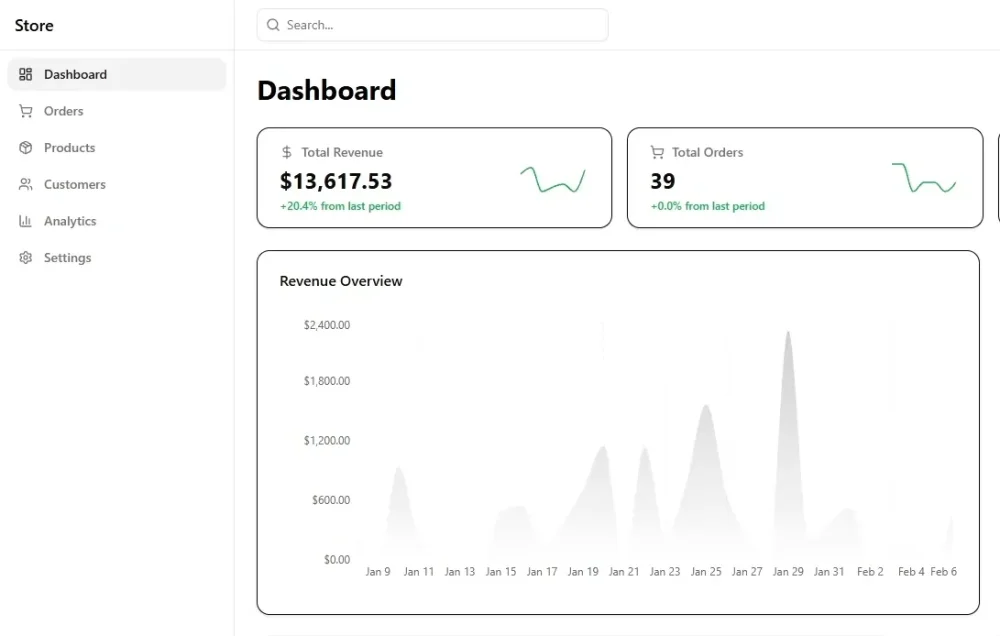
The most impressive part? We did not write the API routes for fetching this data. The Backend Agent exposed the endpoints, and the Frontend Agent consumed them correctly because they communicated the API contract during the generation phase.
Is It Worth It?
Cloudopus 4.6 is a powerhouse, but it is not for everyone.
The Pros:
- Workflow Efficiency: The Agent Teams feature fundamentally changes how we prototype. It is like having a junior dev team at your disposal.
- Context Management: The 1M context window makes it reliable for maintaining large project structures without "forgetting" earlier files.
- Ethical Alignment: Antropy continues to lead in safety, with high scores in resisting malicious prompts and maintaining alignment.
The Cons:
- Resource Intensive: Running multiple agents in parallel burns through tokens rapidly. A complex session like the one we just demonstrated can cost significantly more than a standard single-agent prompt.
- Overkill for Simple Tasks: If you just need a quick function written, spinning up a team is inefficient.
If you are a professional developer or an architect looking to accelerate the scaffolding phase of complex applications, Cloudopus 4.6 is currently the best tool in the market. It moves beyond "chatting with a bot" to "managing a workforce."




Comments (0)
Sign in to comment
Report