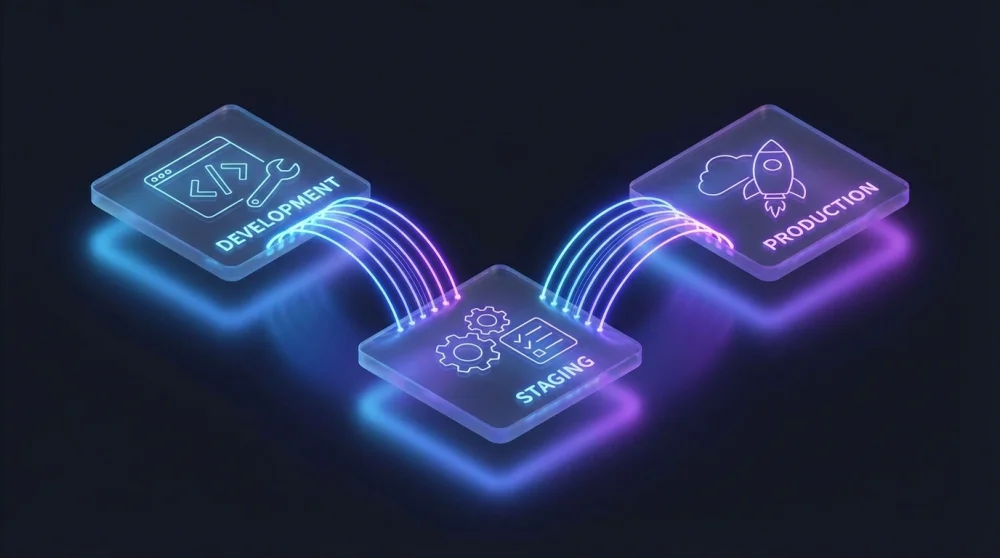
Pushing untested code directly to a live server is the fastest way to corrupt your production database and trigger irreversible data loss. Establishing strict boundaries between your local workspace and the live application ensures that a simple syntax error does not bring down your entire infrastructure.
| Environment | Primary Purpose | Data Type | Access Level | Error Tolerance |
|---|---|---|---|---|
| Development | Building features | Dummy/Mock | Developers | High |
| Staging | QA and validation | Anonymized clone | Internal team | Low |
| Production | Live user access | Real user data | End users | Zero |
The Real Cost of Skipping Staging
Deploying straight to production often results in schema migration failures that lock up database tables for hours. A missing index or a slightly different column type might work perfectly on your local machine. That same migration can cause massive bottlenecks when applied to a database holding millions of rows. Simulating the deployment process on a carbon copy server prevents these catastrophic downtimes.
Development Environment: The Local Sandbox
Your local machine serves as the primary development environment where feature creation begins. You run the application using local servers and connect to isolated, lightweight databases. This isolation allows you to break things repeatedly without affecting other team members. Running your local stack inside WSL 2 on Windows is one of the cleanest ways to match a Linux production server; setting up WSL 2 takes about 10 minutes and eliminates most Windows-only path issues.
Using containerization tools like Docker ensures that your local setup matches the foundational architecture of your servers. You do not need massive datasets here. A small set of dummy data is completely sufficient to verify basic functionality and layout rendering.
Staging Environment: The Final Pre-Flight Check
The staging server acts as the exact replica of your live application. You deploy release candidates here to run automated integration tests and manual quality assurance checks.
The Database Drift Problem
Staging environments quickly become useless if their data structure diverges from your live setup. Database drift happens when manual tweaks or hotfixes are applied to production but skipped in staging. You must implement automated sync scripts that periodically refresh your staging environment. Without this regular synchronization, tests passing in staging will inevitably fail in the real world.
Configuration Mismatches: Why Code Fails in Production
A common trap for engineering teams is relying on mismatched environment variables across different servers. An API endpoint pointing to a test gateway in staging will crash if the production environment variable is missing. Maintaining strict parity across your configuration files is non-negotiable.
PII and Data Leakage Risks in Staging
Copying your live database directly to a staging server introduces severe security vulnerabilities. Staging environments usually have looser access controls, making them prime targets for data breaches. You must run data anonymization scripts to mask sensitive user profiles before the data ever reaches your staging servers.
Production Environment: Zero Error Tolerance
The production environment is where your actual users interact with the software and generate revenue. Every component here runs under the strictest security policies and performance monitoring protocols. You do not test features here.
Debugging Production-Only Bugs Safely
Some edge cases only manifest under the heavy load of real user traffic. You cannot attach a live debugger to a production server without freezing active user sessions. Relying on structured logging and observability platforms allows you to trace the root cause without disrupting the live application. Port conflicts in the development environment are a common early symptom of misconfigured services; finding and killing a process by port resolves these instantly. If an issue is critical, you roll back the deployment immediately and reproduce the state in staging.
Managing Environments in Modern CI/CD Pipelines
Manual deployments via FTP or SSH are obsolete and prone to human error. Modern workflows rely on automated pipelines that push code through each environment systematically. Automated pipelines rely on clean branch strategies; keeping your Git branches well-organized is the first step toward a reliable deployment flow.
Infrastructure as Code
Provisioning servers manually guarantees that your staging and production environments will eventually drift apart. Tools like Terraform and Ansible allow you to define your server architecture in code. You spin up identical environments with a single command. Infrastructure as Code eliminates the dreaded discrepancy between server configurations.
Secrets Management
Storing database passwords and API keys in plain text files is a major security violation. You need dedicated tools to handle sensitive configuration data securely across all environments. Services like AWS Secrets Manager or HashiCorp Vault inject the correct credentials exactly when the application needs them.
Environment Parity Checklist
- Match the underlying operating system and runtime versions perfectly across all servers.
- Automate the deployment process completely to eliminate manual configuration steps.
- Refresh staging data weekly using automated and sanitized database dumps.
- Enforce identical infrastructure provisioning using code-based tools.
- Centralize environment variables using a secure vault system.