
ImageFX is Google’s dedicated playground for AI image generation, built from the ground up as a space to brainstorm visual ideas using their flagship Imagen 3 model. Rather than burying the tech inside search or chat interfaces, Google packaged it into a clean, focused creative lab where you can turn text into surprisingly polished art.
I spent plenty of time putting it through its paces - messing around with everything from the user interface to some truly bizarre prompts. Below, I’ve broken down exactly how it works, what the output actually looks like in practice, where it legitimately blew me away, and where it still falls flat on its face.
ImageFX: The Quick Rundown
- What is it? A totally free AI image maker from Google, powered under the hood by Imagen 3.
- How to Get In: You access it straight through Google’s AI Test Kitchen, and you just need a standard Google Account to log in.
- Availability: It’s rolling out regionally, meaning there’s a real chance it might not be live where you live just yet.
- Best Suited For: Bringing offbeat ideas to life, building believable scenes, and quickly riffing on multiple prompt variations.
- The Standout Feature: Interactive "expressive chips" - clickable keyword pills in your prompt that make fast tweaks painless.
- The Takeaway: Genuinely stunning render quality combined with one of the slickest, most intuitive prompt-tweaking setups out there.
What Makes ImageFX Actually Different?
Look, the web is already overflowing with AI image generators, but ImageFX takes a distinct detour when it comes to the workflow. The entire tool is wired for hands-on experimentation rather than just typing a single line, praying, and starting over from scratch.
Instead of treating prompt crafting like a rigid guessing game, it serves up expressive chips. These are dynamic tags that highlight specific keywords in your prompt, letting you swap adjectives, subjects, or styles on the fly with a quick click. The whole vibe feels less like an automated vending machine and much more like an interactive canvas you're actively jamming with.
It's going toe-to-toe with heavy hitters like Midjourney and DALL-E 3, but its real secret sauce is how easily you can nudge individual pieces of your idea without breaking the rest of the frame. While you might turn elsewhere to enhance product photos with Krea AI, ImageFX is built purely for conjuring high-end concepts straight out of raw text.
Getting Started: A Straightforward Walkthrough
The overall flow is refreshingly clean, though the small quality-of-life controls are where you'll find the real value.
1. Diving Into the AI Test Kitchen
To start, remember that Google hasn't opened the floodgates globally yet. It's living inside Google's experimental AI Test Kitchen, rolling out country by country.
- You'll sign in using your standard Google Account.
- If you hit a brick wall saying it isn't supported in your area, your region simply hasn't made the cut yet. A lot of folks have had luck bouncing around with a VPN, though Google doesn't officially support or guarantee that workaround.
2. Getting Your Bearings Around the Canvas
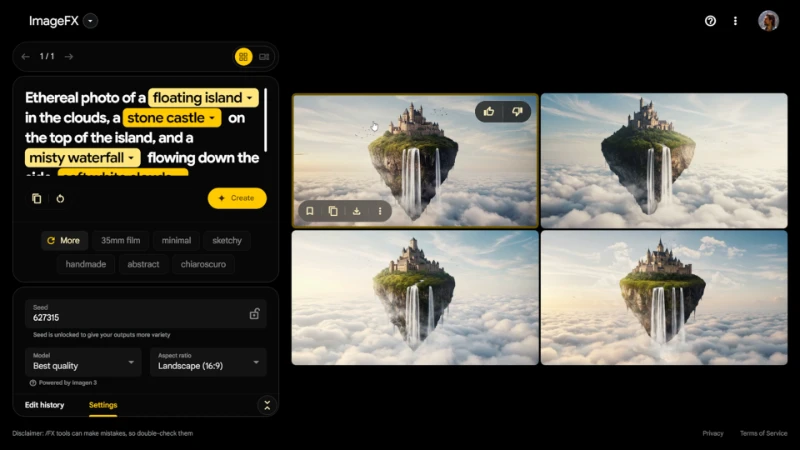
The dashboard doesn't overwhelm you: you get a clean text input on your left and your rendered art showing up on your right. Tucked alongside that prompt bar are a few handy dials:
- Engine Model: Defaults right out of the gate to Imagen 3 ("Best quality").
- "I'm feeling lucky" Dice: A quick-hit button that tosses out wildly imaginative starter prompts when you're hitting creative writer's block.
- Aspect Ratio Toggles: You lock in your dimensions before hitting generate:
- 1:1 (Square): Perfect for your standard Instagram feed posts.
- 9:16 (Vertical): Tailor-made for TikToks, Reels, and YouTube Shorts.
- 16:9 (Widescreen): The sweet spot for YouTube thumbnails or desktop wallpaper layouts.
3. Tapping into Expressive Chips (The Smarter Way to Edit)
This single mechanism basically replaces traditional, clunky image-editing workflows.
If you caught earlier iterations of the interface, you might remember tapping an "edit" button directly on the finished image. That old button is gone, replaced by a far more fluid text-driven mechanic built right into your working prompt.
Whenever you hammer out an idea, ImageFX picks out select descriptors and wraps them into clickable chips. But you aren't stuck with what it guesses - you can highlight literally any word or phrase you wrote and manually turn it into an active chip.
This is essentially how you fine-tune your concept. Give that chip a click, and you'll get a tidy dropdown of alternative suggestions. Pick one, and ImageFX tweaks that exact characteristic while keeping the broader vibe, lighting, and composition surprisingly faithful to your original generation.
Putting ImageFX to the Test: Prompts and Real Outputs
I threw a handful of varied scenarios at the engine to see how it balances stylized character art, dense environments, and tricky real-world anatomy.
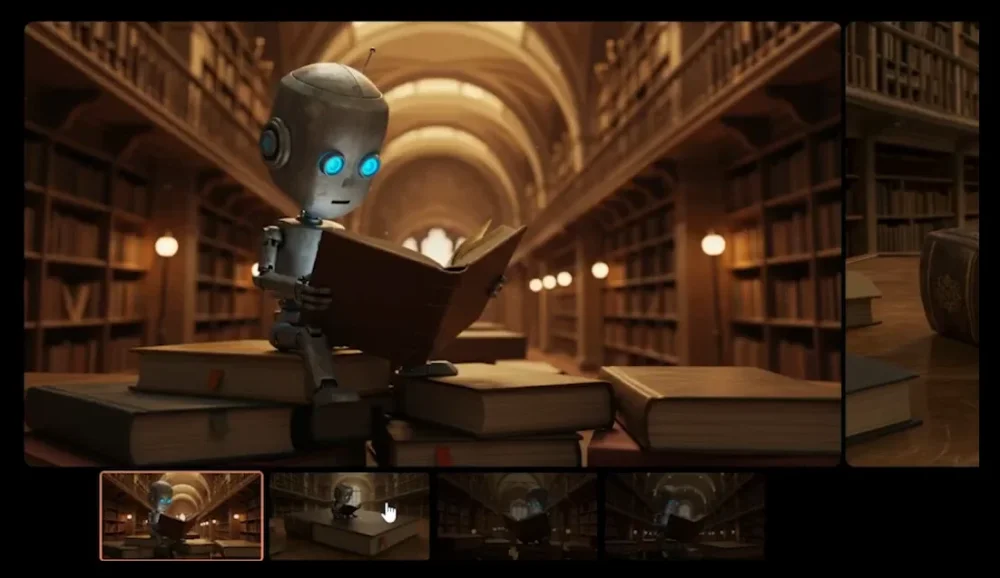
Test 1: The Character Study (Robot in a Library)
- Prompt:
"a robot reading a large book in a library" - Results: [Image showing the generated result for the robot in a library prompt.]
- The Verdict: The mood, lighting, and textural depth were spot-on. It didn't just paste a metallic figure into a background; it handled how the warm library light bounced off the chassis and made an artificial creature feel natural in a human setting.
Test 2: The Complex Scene (Tea-Drinking Dragon)
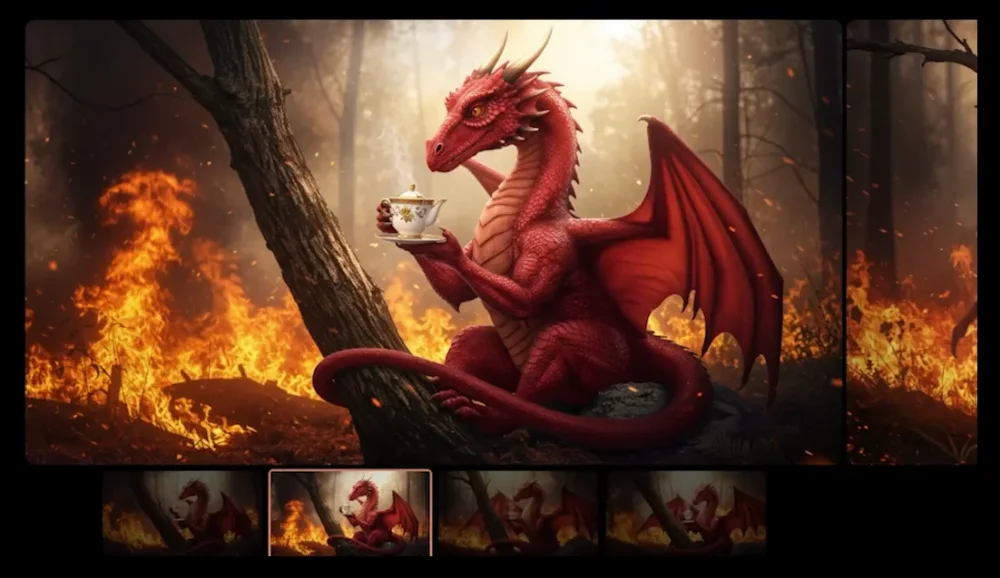
- Prompt:
"a calm dragon drinking tea in a burning forest" - The Verdict: Here’s where expressive chips proved their worth. The system turned "calm" into a pill. Clicking it pulled up a menu where I swapped it to "angry." The model re-rendered the scene instantly - retaining the dragon, the teacup, and the fiery backdrop, but completely overhauling the beast's facial posture into a snarl. That kind of painless iteration beats rewriting full prompts every single time.
Test 3: The Photorealistic Snapshot (Tokyo After Dark)
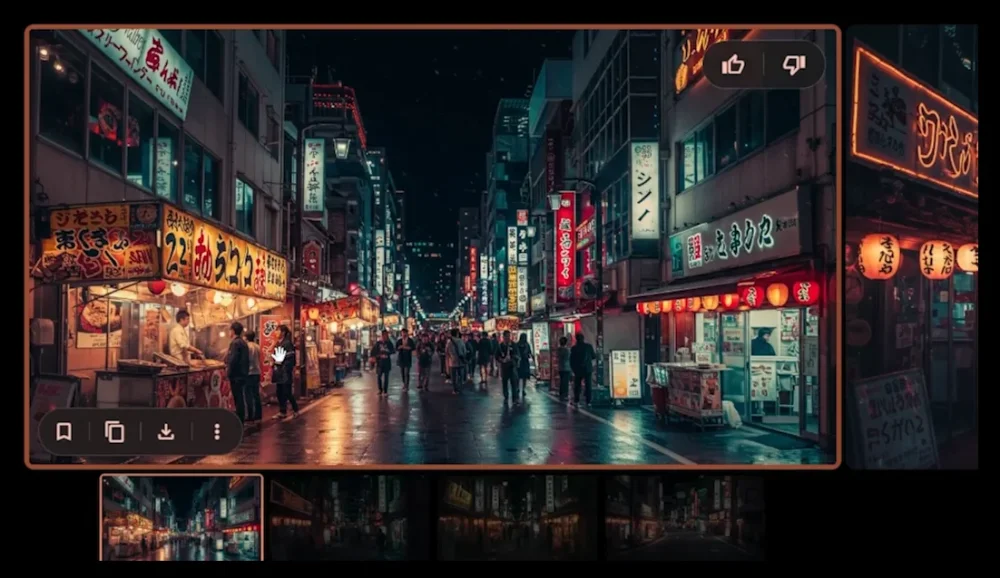
- Prompt:
"a Tokyo night, realistic, 16:9" - The Verdict: The realism here punches right alongside the best generators on the market. From the neon bleed across wet asphalt to the depth of field on distant signs, you would genuinely have to squint to prove this wasn't captured on a high-end mirrorless camera.
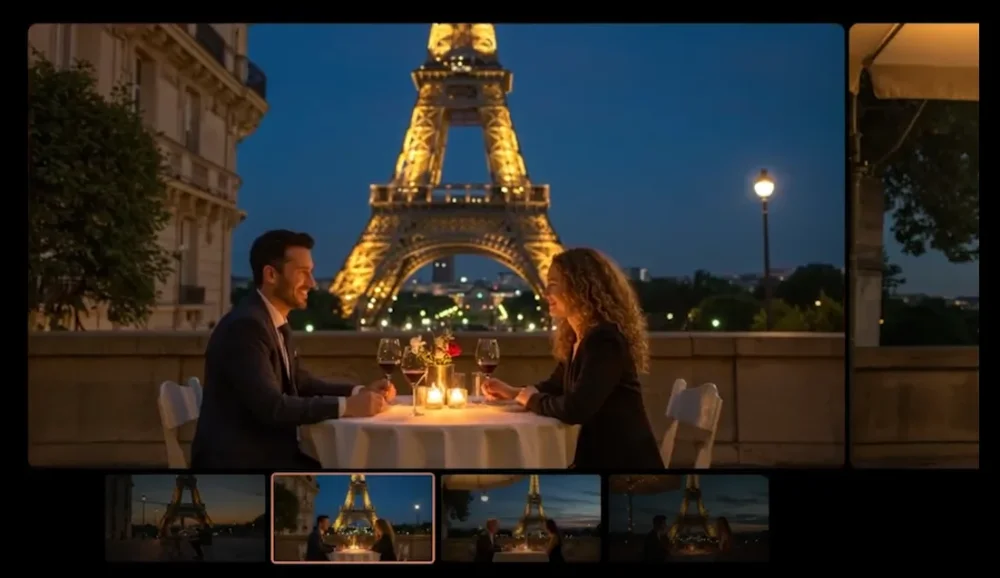
Test 4: The Anatomy Hurdle (Parisian Evening)
- Prompt:
"a romantic dinner near the Eiffel Tower in Paris, 9:16" - The Verdict: Rendering humans is where AI models typically fall apart, but ImageFX held up remarkably well. While you'll still spot the occasional wonky fingernail or slightly melted joint if you zoom way in, the facial geometry, skin tones, and overall proportions looked strikingly grounded and lifelike.
The Final Take: Is ImageFX Worth Your Time?
After putting in serious hours with it, ImageFX feels less like a tech demo and more like a genuinely practical tool you'll actually want to keep bookmarked.
The Good Stuff
- Jaw-Dropping Photorealism: Imagen 3 renders lighting, surfaces, and skin textures with jaw-dropping fidelity.
- Handles Weird Ideas Effortlessly: Throw contradictory or absurd concepts at it and it still manages to assemble a cohesive scene.
- Effortless Iteration: Those expressive chips save you countless minutes of re-prompting when you just want to explore small variations.
- Completely Free: No credit caps or subscription paywalls while it sits in the AI Test Kitchen.
The Rough Edges
- Strict Geo-Fencing: The single biggest annoyance is that plenty of people worldwide are still locked out.
- Familiar AI Quirks: Complex finger poses, tiny text lettering, and microscopic background details can still get a little mushy.
- A Slight Push Toward Presets: The drop-down chips can occasionally tempt you into picking safe, generic words, though you can still type whatever you want manually.
At the end of the day, ImageFX strikes a rare sweet spot between pure creative fun and professional-grade rendering. Whether you're aiming to create a custom action figure of yourself with AI or simply visualize a surreal concept living in your head, it's easily one of the most accessible and capable generators you can play with right now.