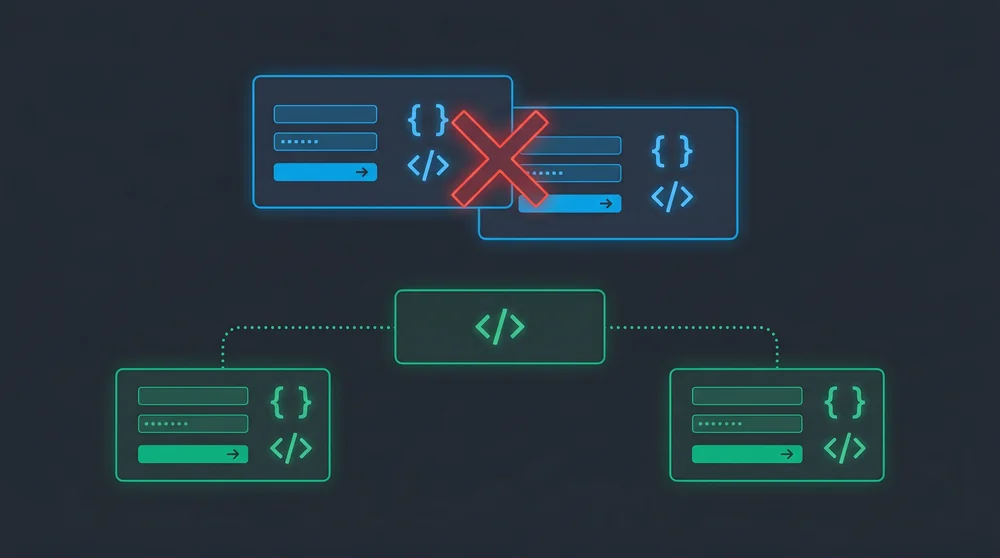
The W3C specification strictly forbids placing one HTML form inside another, and attempting to do so instantly breaks your DOM tree while leaving your inner inputs completely disconnected. You do not need to redesign your entire user interface to solve this architecture conflict. You can achieve the exact same user experience flawlessly by utilizing the HTML5 form attribute or JavaScript event delegation.
- W3C Status: Strictly Forbidden
- DOM Impact: Premature closing of the main form
- Best Native Solution: HTML5 form attribute
- Best JS Solution: Event Delegation
- Current Standard: HTML5
Why a Form Inside a Form Fails W3C Standards
Browsers process HTML documents sequentially and build the DOM tree based on extremely rigid rules. When a browser is inside an active form and encounters a second form tag, it automatically assumes the first form has ended. This parsing behavior leaves your nested inputs completely orphaned. The inner fields are completely ignored when you submit the outer container. This creates a confusing user experience and leads to critical data loss during backend processing.
Why Developers Need Nested Forms
User interface designs frequently force developers to group multiple distinct actions within the same visual container. You encounter this structural conflict most often in admin panels and complex data tables.
Edit and Delete Actions in Table Rows
Admin dashboards usually feature large tables wrapped in a bulk action form. You need separate Delete or Edit buttons for each individual row. Placing a small deletion form inside the massive bulk action container instantly triggers the nesting error.
Independent Search Boxes Within Comprehensive Registration Forms
Complex registration steps or checkout pages sometimes require a quick search function right in the middle of the screen. You want the user to look up a postal code or verify an ID without submitting the entire main form. Creating a separate form block inside the main container looks logical visually but fails technically.
Which Approach Should You Use?
Before diving into code, here is a quick comparison of the three main solutions:
| Approach | JavaScript Required | Browser Support | Best For |
|---|---|---|---|
HTML5 form attribute |
No | All modern browsers | Buttons that live outside their form |
| Multiple independent forms | No | Universal | Truly separate actions (edit vs. delete) |
| JavaScript event delegation | Yes | Universal | Dynamic forms or complex component architectures |
The HTML5 form attribute handles most real-world cases cleanly. Reach for JavaScript only when your component framework makes DOM relocation impractical.
3 Clean Ways to Solve the Nested Form Error
You do not have to rebuild your entire interface to resolve this issue. Modern HTML and basic JavaScript offer exceptionally clean workarounds.
Solution 1: Extracting Buttons with the HTML5 form Attribute
This is the absolute best practice for managing disconnected form inputs. The HTML5 form attribute allows you to place an input or button anywhere on the page and bind it to a specific form ID. You separate the forms completely in the DOM tree while maintaining your visual layout flawlessly.
<form id="main_form" action="/update">
  <!-- main form inputs -->
</form>

<form id="delete_form" action="/delete">
  <input type="hidden" name="item_id" value="42">
</form>

<button type="submit" form="main_form">Update All</button>
<button type="submit" form="delete_form">Delete Item</button>
This approach eliminates the need for complex JavaScript solutions. The browser handles the submission natively and maintains perfect W3C compliance.
Solution 2: Managing Submissions with JavaScript
You cannot always relocate DOM elements easily due to rigid CSS frameworks or component architectures. Use JavaScript to intercept the button click, prevent the default form submission, and trigger an asynchronous request.
Attach an event listener to your specific action button. Call event.preventDefault() immediately to stop the main form from triggering. Extract the necessary data points and send them via the Fetch API.
document.getElementById('deleteBtn').addEventListener('click', async (e) => {
  e.preventDefault();
  e.stopPropagation();

  const itemId = e.target.dataset.id;
  await fetch('/delete', {
    method: 'POST',
    headers: { 'Content-Type': 'application/json' },
    body: JSON.stringify({ item_id: itemId })
  });
});
If you are handling async operations in React, the same async useEffect patterns apply when chaining form submissions to side effects.
Solution 3: Routing Form Actions Through the Backend
You can use a single form and parse the actions on your server if you prefer relying entirely on standard HTML submissions without JavaScript. Give your submission buttons different names and values.
<form action="/process" method="POST">
  <!-- shared inputs -->
  <button type="submit" name="action" value="update">Update</button>
  <button type="submit" name="action" value="delete">Delete</button>
</form>
The browser sends the clicked button's value in the request payload. Your PHP or Node.js backend reads this value and routes the logic to the appropriate controller. This keeps the frontend exceptionally simple but requires stricter validation on your server.
Framework-Specific Considerations
The HTML constraint applies regardless of which framework you are using. Here is how each major stack handles it.
Laravel
Laravel Blade templates do not change the HTML parsing rules. The most common pattern is combining the form attribute with @method and @csrf directives in separate Blade components:
<form id="update_form" action="{{ route('items.update', $item) }}" method="POST">
  @csrf
  @method('PUT')
  <!-- inputs -->
</form>

<form id="delete_form" action="{{ route('items.destroy', $item) }}" method="POST">
  @csrf
  @method('DELETE')
</form>

<button type="submit" form="update_form">Update</button>
<button type="submit" form="delete_form">Delete</button>
If you are using Laravel Nova, the laravel-nova-nested-form package manages nested relationship forms at the resource level, but it does not bypass the HTML nesting constraint on the frontend.
React
React component trees can visually suggest nesting that does not exist in the rendered DOM. The rule is the same: no <form> can descend from another <form> in the final HTML output.
The cleanest approach is rendering the secondary form outside the parent component using a portal:
import { createPortal } from 'react-dom';

function DeleteButton({ itemId }) {
  return createPortal(
    <form id="delete_form" action="/delete" method="POST">
      <input type="hidden" name="item_id" value={itemId} />
      <button type="submit">Delete</button>
    </form>,
    document.body
  );
}
React Hook Form does not support nested forms at the HTML level either. The recommended pattern is managing separate form instances with individual useForm() calls, then syncing shared state between them. If you are setting up a new React project, the alternatives to Create React App each handle this pattern slightly differently.
Vue
In Vue, the constraint is identical. Use the form attribute approach or emit separate events per action:
<template>
  <div>
    <form id="main-form" @submit.prevent="handleUpdate">
      <!-- inputs -->
    </form>
    <button type="submit" form="main-form">Update</button>

    <form id="delete-form" @submit.prevent="handleDelete">
      <input type="hidden" name="id" :value="item.id">
    </form>
    <button type="submit" form="delete-form">Delete</button>
  </div>
</template>
Before and After: Refactoring a Nested Form
Here is the most common real-world scenario. A developer writes this first:
<!-- BROKEN: nested forms -->
<form id="bulk-form" action="/bulk-update">
  <table>
    <tr>
      <td><input type="checkbox" name="ids[]" value="1"></td>
      <td>Item A</td>
      <td>
        <form action="/delete/1" method="POST">
          <button type="submit">Delete</button>
        </form>
      </td>
    </tr>
  </table>
  <button type="submit">Bulk Update</button>
</form>
The browser closes bulk-form the moment it hits the inner <form>. The checkboxes end up outside any form, and bulk update loses every selected ID silently. Here is the fix:
<!-- FIXED: form attribute approach -->
<form id="bulk-form" action="/bulk-update">
  <table>
    <tr>
      <td><input type="checkbox" name="ids[]" value="1"></td>
      <td>Item A</td>
      <td>
        <button type="submit" form="delete-1">Delete</button>
      </td>
    </tr>
  </table>
  <button type="submit">Bulk Update</button>
</form>

<form id="delete-1" action="/delete/1" method="POST" hidden>
</form>
Each delete form lives outside the bulk form. Each gets a unique ID. Buttons point to their respective forms via the form attribute. The checkboxes stay inside bulk-form and submit correctly.
Incorrect Architectural Approaches to Avoid
Do not attempt to trick the browser by hiding unclosed tags or manipulating the DOM tree with JavaScript after the initial load just to force a nested structure. Browsers constantly update their error correction algorithms and your makeshift solution eventually breaks. Relying on absolute positioning to visually overlay an independent form on top of another is equally dangerous and severely harms accessibility standards.
The form attribute approach covers 90% of admin panel scenarios without a single line of JavaScript. Start there.